
Business Directory Contact Form - Installation
Installation
This feature is only available in the Pro edition.
Installation
- To manually install the add-on, you first must download it from Client Dashboard (Pro version) to your computer.
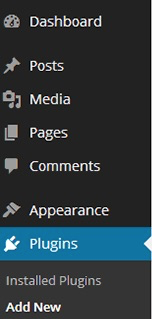
- In the WordPress admin area, hover over the Plugins menu and click on Add New:
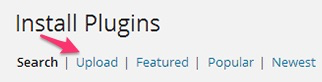
- Select Upload, and find the file you downloaded:
- Install and activate the plugin.
- Once the plugin is activated, the add-on will appear as new settings for the CM Expert Directory Pro plugin.
-If the CM Business Directory Pro plugin is not activated, you will see an error message.
To create a new contact form, go to your WordPress admin area.
Select CM Business Directory Pro from the menu, and then Settings:

On the Settings page, select the Contact Form tab:

 |
Get more information about the CM Business Directory Form WordPress Add-on Other WordPress products can be found at CreativeMinds WordPress Store |
 |
Let us know how we can Improve this Product Documentation Page To open a Support Ticket visit our support center |